PandaDoc eSignature: A Comprehensive Guide to Digital Document Management
Key Takeaways
- PandaDoc eSignature is legally binding under ESIGN and UETA in the US, eIDAS in the EU, and equivalent frameworks in Australia, Canada, and the UK.
- The platform ships with real-time tracking, reusable templates, mobile signing, and native integrations with major CRMs and payment processors.
- PandaDoc’s honest edge is not standalone eSig; it is proposal building, quoting, and signing in one workflow. If you only need signatures, cheaper tools exist.
- Compared with DocuSign, Adobe Sign, and Dropbox Sign, PandaDoc wins on in-document editing, quoting blocks, and pricing floor for small teams.
- Implementation is fast: create an account, upload or build a template, add signature fields, send. Most teams are signing live documents within a day.
- Common friction is not the tool; it is team habit change and integration mapping. Both are solved with a short training pass and a CRM audit.
In today’s fast-paced business environment, efficiency and security are paramount. PandaDoc eSignature offers a seamless solution for businesses looking to streamline their document signing processes. This guide will explore the ins and outs of PandaDoc eSignature, providing you with the knowledge to leverage this tool effectively. As organizations increasingly shift toward digital solutions, understanding the capabilities of eSignature platforms like PandaDoc becomes essential for maintaining a competitive edge in the market.
What is PandaDoc eSignature?
PandaDoc eSignature is a legally binding electronic signature tool built into the wider PandaDoc document platform. It lets senders collect signatures, initials, and form-field input on any uploaded PDF or PandaDoc-built document, tracks every recipient action, and produces a court-admissible audit trail. It works in a browser, on mobile, and via API.
It eliminates the need for physical paperwork, making the signing process faster and more secure. With PandaDoc, businesses can manage their documents from anywhere, at any time. This flexibility is particularly beneficial in today’s remote work environment, where teams may be dispersed across various locations. The ability to sign documents on the go not only enhances productivity but also fosters a more agile business model that can adapt to changing circumstances.

What are the key features of PandaDoc eSignature?
PandaDoc eSignature bundles secure signing, real-time tracking, reusable templates, mobile access, and deep integrations into one platform. The signing engine itself is production-grade and comparable to DocuSign or Adobe Sign. The differentiator is what surrounds the signature: content blocks, pricing tables, and CRM sync inside the same document.
Understanding these features can help you maximize the tool’s potential. The platform is designed with user-friendliness in mind, ensuring that even those who are not tech-savvy can navigate it with ease. Additionally, PandaDoc integrates with various third-party applications, allowing for a more cohesive workflow across different business functions. Well-built PandaDoc templates amplify all of the below.
Secure Signing: PandaDoc ensures that all signatures are legally binding and secure, using advanced encryption technologies. This level of security is crucial for businesses that handle sensitive information, as it helps to build trust with clients and partners.
Real-Time Tracking: Monitor the status of your documents in real time, knowing exactly when they are viewed and signed. This feature not only keeps you informed but also allows for timely follow-ups, ensuring that no document falls through the cracks.
Customizable Templates: Create and save templates for frequently used documents, saving time and ensuring consistency. This feature is particularly useful for businesses that require standard contracts or agreements, as it reduces the likelihood of errors and omissions.
Mobile Accessibility: With PandaDoc’s mobile app, users can access and sign documents from their smartphones or tablets, providing unparalleled convenience. This is especially beneficial for sales teams or field agents who may need to finalize agreements while on the move.
Integration Capabilities: PandaDoc integrates with popular CRM systems, payment processors, and other business tools, allowing for a streamlined workflow. This means that you can manage your entire document lifecycle without having to switch between multiple applications.

What are the benefits of using PandaDoc eSignature?
Adopting PandaDoc eSignature reduces cycle times, cuts print and courier costs, tightens security, improves the client experience, and gives you analytics on every send. Teams that switch from PDF-and-email typically see close times drop by 20 to 40 percent because recipients can sign on a phone in under a minute rather than printing, scanning, and returning.
Increased Efficiency: Reduce the time spent on document processing, allowing your team to focus on more critical tasks. By automating the signing process, you can eliminate bottlenecks that often occur with traditional methods.
Cost Savings: Cut down on printing, mailing, and storage costs associated with traditional paper documents. The reduction in physical resources not only saves money but also contributes to a more sustainable business model.
Enhanced Security: Protect sensitive information with robust security measures, reducing the risk of data breaches. PandaDoc complies with industry standards and regulations, ensuring that your documents are safe from unauthorized access.
Improved Customer Experience: By providing a quick and easy signing process, you enhance the overall experience for your clients. A smooth transaction can lead to higher satisfaction rates and increased loyalty.
Analytics and Insights: Gain valuable insights into your document performance through analytics features. Understanding how long documents take to be signed and which parts of the process may need improvement can help you refine your operations.
PandaDoc eSignature vs DocuSign vs Adobe Sign vs Dropbox Sign
If you only need to collect a signature on a finished PDF, all four tools do the job. The real difference is what happens inside the document and how much you pay to start. PandaDoc is the only one of the four with a genuine free eSig tier and a full document builder in the base product.
| Capability | PandaDoc eSignature | DocuSign | Adobe Sign | Dropbox Sign (HelloSign) |
|---|---|---|---|---|
| Legal validity (ESIGN, UETA, eIDAS) | Yes | Yes | Yes | Yes |
| Free plan with unlimited eSig | Yes (Free eSign) | No | No | Limited (3 docs/month) |
| Paid entry price (per user, per month) | $19 (Essentials) | $15 (Personal, 5 sends/mo) | $14.99 (Acrobat Standard) | $20 (Essentials) |
| In-document editing and content blocks | Native | Add-on / CLM tier | Limited | No |
| Pricing tables and quoting inside doc | Yes | No | No | No |
| Native CRM integrations (Salesforce, HubSpot, Pipedrive) | All three, native | Salesforce native, others via connector | Salesforce native | HubSpot native, others via API |
| Audit trail and certificate of completion | Yes | Yes | Yes | Yes |
| Best fit | Sales teams sending proposals + contracts | Enterprise legal + procurement | Adobe / Acrobat shops | Lightweight PDF signing |
The honest read: if your workflow is “build a proposal, quote it, send it, sign it, sync to CRM,” PandaDoc collapses four tools into one. If your workflow is “send a finished contract from legal for signature,” DocuSign or Dropbox Sign are equally valid and sometimes cheaper at scale.
How do you implement PandaDoc eSignature in your business?
Implementing PandaDoc eSignature takes three steps: create your account and pick the right plan, build or upload your first document with signature fields, and send it. Most solo users are live in under an hour. Teams with existing CRM or template libraries should budget a day for integration mapping and template migration.
1. Setting Up Your PandaDoc Account
Begin by creating a PandaDoc account. This will be your hub for managing all eSignature activities. Ensure you choose a plan that aligns with your business needs. PandaDoc offers various pricing tiers, each designed to cater to different organizational sizes and requirements. Take the time to evaluate the features included in each plan, as this will help you make an informed decision that best suits your operational goals. If you get stuck on plan selection or workspace setup, get PandaDoc help rather than trial-and-erroring.
2. Creating and Sending Documents
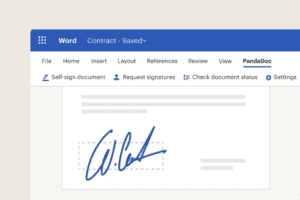
Once your account is set up, you can start creating documents. Use PandaDoc’s intuitive interface to draft or upload documents, then add signature fields as needed. The platform supports a variety of file formats, making it easy to work with existing documents. After preparing your document, send it to the relevant parties. PandaDoc allows you to track the document’s progress, ensuring timely completion. You can also set reminders for recipients who may need a nudge to complete the signing process, further enhancing your efficiency.
What are the best practices for using PandaDoc eSignature?
The four best practices that separate quick wins from stalled rollouts: confirm legal compliance for every jurisdiction you sell into, invest in reusable templates before your first send, train the team so no single person becomes the PandaDoc bottleneck, and lean on official tutorials and support instead of guessing. Skip any of these and you will feel it within a month.
1. Ensure Legal Compliance
Familiarize yourself with the legal requirements for electronic signatures in your jurisdiction. PandaDoc complies with major eSignature laws, but it’s essential to understand local regulations. This knowledge will not only protect your business but also instill confidence in your clients, knowing that their agreements are legally sound. Additionally, staying updated on any changes in legislation regarding electronic signatures can help you maintain compliance and avoid potential legal issues.
2. Optimize Document Templates
Take advantage of PandaDoc’s template feature. By creating templates for recurring documents, you can streamline your workflow and maintain consistency across all communications. This practice not only saves time but also ensures that all necessary information is included in each document, reducing the risk of errors. Regularly review and update your templates to reflect any changes in your business processes or legal requirements, ensuring that they remain relevant and effective.

3. Train Your Team
Provide training for your team members to ensure they are comfortable using PandaDoc eSignature. This will help maximize the tool’s effectiveness and minimize errors. Consider organizing workshops or training sessions that cover the platform’s features, best practices, and troubleshooting tips. Encouraging team members to share their experiences and tips can also foster a collaborative learning environment, leading to a more proficient use of the tool across your organization.
4. Utilize Customer Support and Resources
PandaDoc offers a wealth of resources, including tutorials, webinars, and customer support, to help users navigate the platform effectively. Take advantage of these resources to deepen your understanding of the tool and its capabilities. Engaging with the community through forums or user groups can also provide valuable insights and tips from other users who have successfully implemented PandaDoc in their businesses. This collaborative approach can lead to innovative ways to utilize the platform and enhance your document management processes.
What are the common challenges and how do you solve them?
The three challenges teams hit most often are resistance to change from legacy paper workflows, occasional technical issues that need a defined escalation path, and integration friction when connecting PandaDoc to an existing CRM or ERP. All three are predictable and solvable inside the first 30 days if you plan for them; they only become sticky when nobody owns them.
1. Resistance to Change
Some team members may be hesitant to adopt new technology, preferring traditional methods. To address this, emphasize the benefits of PandaDoc eSignature, such as increased efficiency and reduced errors. Share success stories from other teams or departments that have successfully transitioned to the platform. Providing ongoing support and encouragement can also help ease the transition and foster a more positive attitude toward the change.
Tip: Try offering step-by-step training sessions to help everyone get comfortable with PandaDoc eSignature. When people see how easy it is to use, they might feel less worried about switching from the old way of doing things.

2. Technical Issues
Like any software, users may experience technical difficulties. Ensure that your team knows how to access customer support and utilize available resources. Regularly check for software updates and encourage team members to report any issues they encounter. Establishing a designated point of contact for technical support within your organization can streamline the troubleshooting process and ensure that issues are resolved promptly.
3. Integration Challenges
Integrating PandaDoc with existing systems may pose challenges. To mitigate this, conduct a thorough assessment of your current software landscape before implementation. Identify any potential compatibility issues and plan for necessary adjustments. Collaborating with your IT department or a third-party consultant can also facilitate a smoother integration process, ensuring that all systems work harmoniously together.
Frequently Asked Questions
Is PandaDoc eSignature legally binding?
Yes. PandaDoc eSignature complies with the US ESIGN Act and UETA, EU eIDAS regulations, and equivalent electronic signature frameworks in the UK, Canada, and Australia. Every signed document ships with a certificate of completion showing signer identity, IP address, timestamp, and email audit trail, which is what makes it admissible in court.
Can I use PandaDoc eSignature for free?
Yes. PandaDoc offers a Free eSign plan with unlimited document uploads and unlimited signatures for a single user. It includes the mobile app, payment collection, and the audit trail. You lose templates, content library, CRM integrations, and multi-user workflows on the free tier, which is where most teams eventually hit the ceiling.
How is PandaDoc eSignature different from DocuSign?
Both are legally equivalent for signature collection. DocuSign is deeper on enterprise legal, procurement, and CLM. PandaDoc is deeper on the document itself: in-line editing, pricing tables, content blocks, and native quoting. Sales-led teams usually prefer PandaDoc; legal-led enterprise buyers usually prefer DocuSign.
Do recipients need a PandaDoc account to sign?
No. Recipients open the document through a unique signing link in their email, complete the fields on any device, and click to sign. No account, no download, no plugin. This is the same frictionless flow as DocuSign and Adobe Sign.
When should I use PandaDoc for more than just eSignature?
If you regularly send proposals, quotes, or SOWs that need pricing logic, approval workflows, and CRM sync, standalone eSig leaves value on the table. The Proposal Engine service is built for this: it wires PandaDoc into your sales stack so proposals are generated, sent, tracked, and signed as one integrated flow instead of four disconnected steps.
Key Takeaway
PandaDoc eSignature is a powerful tool that can transform the way your business handles documents. By understanding its features and implementing best practices, you can enhance efficiency, reduce costs, and improve security.
Start leveraging PandaDoc eSignature today to take your document management to the next level. The transition to a digital document management system is not just a trend; it is a necessary evolution in the way businesses operate in the modern world. Embracing this change can lead to significant improvements in productivity and customer satisfaction. Ready to streamline your document processes? Explore PandaDoc eSignature and see the difference it can make for your business.
Streamline Your Sales with Pure Proposals
As you embrace the digital revolution with PandaDoc eSignature, take your efficiency a step further with Pure Proposals. Specializing in automating the proposal creation and sending processes, we empower your business to dramatically reduce preparation time and boost close rates.
With personalized templates and CRM integrations, Pure Proposals complements PandaDoc’s capabilities, ensuring your sales team can concentrate on sealing the deal.
Automate your proposal creation process today and transform your sales workflow into a powerhouse of productivity and precision.